


Jason's Deli
4.81.14K Reviews
App Specs
- Version
- 26.4.3
- Updated On
- License
- Free
- Downloads
- 500,000+
- Developer
- Jason's Deli
- Categories
- Food & Drink
- Platform
- Android, iOS
Screenshots

 Analysis by AppCompare
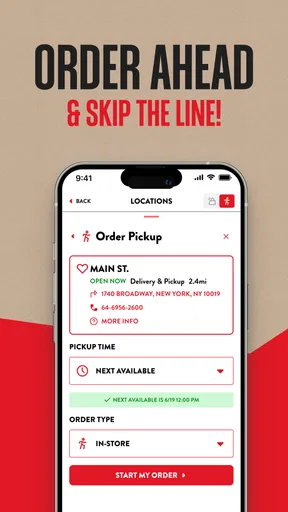
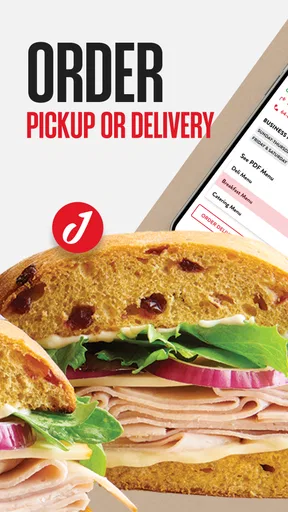
I like food-ordering apps most when they remove one annoying step without creating three new ones. Jason’s Deli is built around that simple idea: place an order for delivery or take-out without waiting in the restaurant line. After using it as a Food & Drink app, I found its main value is not novelty but convenience. It gives Jason’s Deli customers a direct way to plan a meal, adjust an order, and send it through the restaurant’s own ordering experience.
Jason's Deli is free, developed by Jason's Deli, and suitable for everyone. It has been available since April 30, 2017, and the current version is 26.4.3 for devices running Android 7.0 or later. Its average rating is 4.8 from around 6,100 ratings, while the app has passed 500,000 installs. Those figures suggest that it has become a familiar option for people who already order from the chain, although popularity alone does not remove the need to check the details of each order before paying.
Where the ordering experience can slow you down
The first thing I would tell a new user is not to treat this as a general restaurant marketplace. The app makes the most sense when you already want Jason’s Deli. If you are comparing several nearby restaurants, looking for the lowest delivery fee, or hoping to browse every local food option in one place, a broader delivery service may be more useful. This app is focused, and that focus is both its strength and its limitation.
Users can get stuck before they even reach the menu if the restaurant location is not selected correctly. A familiar Jason’s Deli name does not necessarily mean every location offers the same ordering choices. Availability can depend on the branch serving the chosen address, so I recommend checking the selected location before spending time customizing a meal. This is especially important when ordering for an office, hotel, campus, or another place where the delivery address is not your usual one.
Another common point of friction is assuming that “take-out” and “delivery” work the same way. They do not serve the same purpose. Take-out is usually the better choice when I am already nearby and want to control the pickup timing myself. Delivery is more convenient when leaving the house or workplace is difficult, but it introduces another part of the process that is outside the app’s direct control. Choosing the wrong option early can mean rebuilding the order rather than simply changing one small detail.
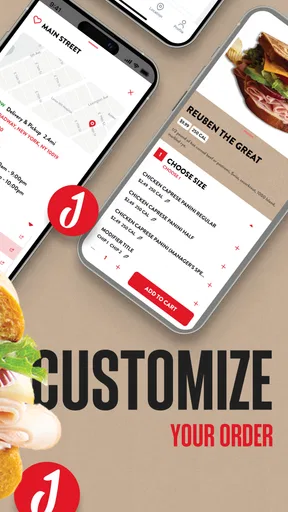
The menu can also encourage rushed decisions. It is easy to focus on the main item and overlook sides, drinks, substitutions, or special instructions. My practical habit is to pause at the review stage and read the entire basket as if someone else had packed it. That catches accidental duplicates, an unwanted add-on, or a customization that did not carry over as expected.
Why the direct restaurant app can be preferable
Compared with a typical third-party delivery marketplace, the Jason’s Deli app feels more appropriate when I already know which restaurant I want. I do not have to sort through unrelated businesses, and the ordering path is centered on Jason’s Deli’s own menu and locations. That can make a repeat order feel less distracting than using a marketplace with many competing listings.
Worth Reading Before You Choose

EA SPORTS FC Mobile 26 Is a Bigger Football Game, but It Takes Time

Flipboard Shows What News Apps Must Do Beyond the Feed

Switching to Android Auto Means Rethinking Your Driving Routine

Google Calendar Makes a Crowded Week Easier to Manage

Ludo King Makes the Most of the Minutes Between Plans

Baby Panda World Brings Quick Play to Modern Phones, but Its Game Library Feels Busy
The trade-off is choice. A marketplace may make it easier to compare restaurants, delivery coverage, estimated arrival times, and offers in one place. The Jason’s Deli app is not the right tool for that kind of comparison. I would use it for a planned order from this chain, not as my universal answer to hunger.
Setup checks that prevent avoidable problems
Before building an order, I would check three basics: the device meets the minimum operating-system requirement, the correct restaurant location is active, and the chosen service type matches the plan. The app supports Android 7.0 and newer, so an older device may be the problem before the app itself has a chance to load properly. On a compatible phone, closing other demanding apps and reopening the ordering app is a sensible first step if screens behave slowly.
Location selection deserves more attention than it usually gets. If I am ordering for pickup, I confirm the branch and the intended pickup method before customizing anything. If I am ordering delivery, I carefully review the destination, especially when using a saved address or placing an order from a different neighborhood. A correct street address paired with the wrong restaurant location can still produce confusion.
I also recommend setting aside a moment to read the menu item description rather than relying on memory. Restaurant menus often contain similarly named choices, and a quick tap can add the wrong size or variation. The app’s convenience is greatest when the order is straightforward; once I start making several changes, deliberate checking becomes more valuable than speed.
For a first order, I would keep the process simple. Choose one meal, review the available adjustments, add only what is wanted, and inspect the basket before continuing. This is not because the app is difficult, but because a small trial order shows how the selected location, service method, customization controls, and final review behave on your device. After that, repeat orders should feel more predictable.
How I prepare an order for a busy day
My preferred workflow for a workday is to decide the delivery or pickup plan before opening the menu. If several people are eating, I write down each person’s order first. Then I add items one at a time and check them against that short list. This sounds basic, but it prevents the app from becoming the place where I try to remember everyone’s preferences under time pressure.
For pickup, I would avoid waiting until the last possible minute if the meal is needed for a meeting or a strict break. The app can send the order, but I still need to allow time for preparation and travel to the restaurant. For delivery, I would provide clear instructions in the appropriate part of the order if that option is available, while remembering that the driver may still need to contact me or make practical decisions at the destination.
A useful, less obvious habit is taking a screenshot or note of the final order confirmation when the meal matters. I do not use that as a substitute for the app’s own confirmation, but it gives me a quick reference for the selected location, service type, and items. It is particularly helpful when ordering for a group and trying to answer a question without reopening every screen.
Recovering when an order does not go as planned
If the app freezes during browsing, I first distinguish between a temporary display problem and an order-submission problem. I close and reopen the app, check whether the basket still contains the intended items, and avoid tapping the final submission control repeatedly. Repeated attempts can create uncertainty about whether more than one order was sent, so I prefer to verify the status before trying again.
If the basket looks empty after reopening, I do not immediately assume the original order disappeared. I check for a confirmation or order-history area within the app, if available, and I look for the restaurant’s confirmation message through the contact method used during ordering. The important point is to establish whether the order was accepted before rebuilding it from scratch.
When an item or customization appears wrong, I review the order summary carefully. Sometimes the issue is simply that I selected a different menu variation than intended. If the submitted order itself is incorrect, the app may no longer be the right place to fix it. At that point, contacting the selected Jason’s Deli location promptly is more practical than repeatedly editing the app, because the restaurant is the party preparing the food.
For a failed payment or an error near checkout, I would first confirm that the order was not already accepted. Then I would retry once after reopening the app or checking the connection. If the same problem continues, switching between a reliable Wi-Fi connection and mobile data can help identify a local connection issue. I would avoid making many rapid attempts, particularly when the screen gives an unclear result.
These recovery steps are intentionally simple. They do not promise that every issue can be solved inside the app. The useful distinction is knowing when to refresh the app, when to verify the order, and when to contact the restaurant rather than losing time repeating the same action.
What to do when the app is not the cause
Ordering software can be blamed for problems that actually come from the restaurant, the network, the address, or the payment method. A delayed meal, for example, may involve preparation time, traffic, driver availability, or an incorrect destination. The app is the channel used to place the order, but it cannot control every stage after submission.
If the menu looks different from what I expected, I check the selected location before assuming the app is displaying incorrect information. Local availability can explain why an item or service choice appears differently. If delivery is unavailable, I also check whether the address is inside the restaurant’s service area rather than repeatedly restarting the phone.
Connection quality is another easy culprit. A weak signal can make a menu appear incomplete, leave a button unresponsive, or interrupt checkout. I wait for the screen to finish loading, then confirm the basket before taking another action. Clearing the app from recent tasks and reopening it is a reasonable general step, but I would not erase stored app information unless I am prepared to sign in or rebuild settings again.
Device age matters as well. The current version requires Android 7.0 or later, and an older operating system may not provide a reliable environment for newer app releases. If the phone is compatible but storage is nearly full, freeing some space and restarting can also be worthwhile. These are ordinary maintenance checks, yet they often explain why one app behaves poorly while other apps seem normal.
There are also situations where a different ordering method is better. If I need to compare several restaurants, a marketplace is more efficient. If I am already standing near the restaurant and the app is having trouble, asking the location directly may be faster than troubleshooting on the sidewalk. If a group needs a highly customized catering-style arrangement, a direct conversation can be clearer than entering every detail through a mobile menu.
Who will get the most from it
This app is a good fit for regular Jason’s Deli customers who want a repeatable way to arrange take-out or delivery. It is especially useful for someone who dislikes waiting in line, orders from the same restaurant often, or wants to build an order away from the counter. Families can benefit from reviewing the basket together, while office workers can prepare a meal order before the group’s break begins.
It is also a sensible choice for people who prefer a restaurant-specific experience over a broad delivery catalog. The narrower scope means less browsing, which I see as an advantage when the decision has already been made. The free price removes a barrier to trying it, although the overall cost and convenience of any order still depend on the selected service and the customer’s situation.
I would be more cautious if you rarely visit Jason’s Deli or mainly choose food by comparing nearby restaurants. In that case, installing a dedicated app may add an extra step rather than remove one. I would also skip relying on it as the only plan for a time-critical meal until I had completed a normal order and understood how the selected location handles pickup or delivery.
My practical verdict after using it
Jason’s Deli succeeds because it keeps its purpose clear: it is a direct ordering tool for one restaurant, with delivery and take-out at the center. I appreciate that focus when I already know what I want. The strongest experience comes from checking the location, choosing the service method carefully, and reviewing the full basket before submitting.
Its weaknesses are mostly tied to that same focused design. It will not replace a multi-restaurant marketplace, and it cannot solve problems caused by an incorrect address, a poor connection, restaurant delays, or an older device. Some users may also find that contacting the location is faster when an order needs urgent correction.
My recommendation is straightforward: if Jason’s Deli is already part of your regular meal routine, the app is worth trying because it can make planned take-out and delivery less cumbersome. Start with a simple order, confirm every detail, and save the troubleshooting steps above for the moments when the screen or checkout does not behave as expected. For occasional diners who want broad comparison tools, another ordering option may fit better. For loyal customers who mainly want to skip the line, this is a practical, focused app that earns its place on the phone.
Pros
- Generous portions make many menu items suitable for sharing.
- Online ordering helps reduce waiting during busy lunch periods.
- Catering options cover office meetings
- parties
- and family gatherings.
- Many locations provide convenient pickup and delivery choices.
- Loyalty rewards can make frequent visits more worthwhile.
Cons
- Menu prices may feel high compared with standard fast-food options.
- Food quality and service can vary noticeably between locations.
- Some meals are less convenient to eat while traveling.
- Delivery availability and fees depend on the local restaurant.
- Popular locations may have limited parking during peak hours.
FAQs for Jason's Deli
What is Jason’s Deli, and what can I do with the app?
Jason’s Deli is a restaurant app for browsing the menu, finding nearby locations, checking store hours, and exploring available ordering options. Depending on your location, you may be able to place a pickup or delivery order, customize menu items, review nutritional information, and access current promotions. The exact features can vary by restaurant and region.
Can I order Jason’s Deli food for pickup or delivery?
The app is designed to help customers order Jason’s Deli meals through available pickup and delivery services. After entering your location, you can select a participating restaurant, browse eligible menu items, customize your order, and choose an available fulfillment method. Delivery coverage, fees, minimum order requirements, and estimated times may differ between locations.
Does the Jason’s Deli app provide nutrition and allergen information?
Jason’s Deli is known for offering menu and nutrition details, which can help users review calories, ingredients, and dietary information before ordering. However, allergen information should be treated as a guide rather than a guarantee because food may be prepared in shared kitchen areas. Customers with serious allergies should contact the restaurant directly before placing an order.
Can I use rewards, discounts, or promotional offers in the app?
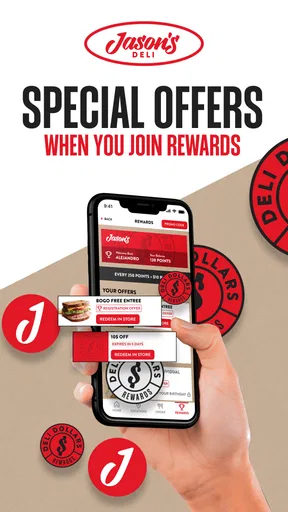
Available rewards and promotions depend on the current Jason’s Deli program and your selected location. If supported, the app may allow you to sign in, view eligible offers, apply discounts during checkout, or track loyalty benefits. Some promotions may have restrictions, expiration dates, participating-store requirements, or exclusions, so read the terms carefully before completing your purchase.
Is the Jason’s Deli app free to download and use?
The Jason’s Deli app is generally free to download, and there is typically no separate charge simply for browsing the menu or locating a restaurant. Nevertheless, your final order total may include food prices, taxes, delivery charges, service fees, or other applicable costs. Availability and pricing can vary by location, so review the checkout summary before confirming payment.


